The POS built for
wireless dealers.
Carrier payments, repairs, unlocks, layaways, store credit and quarterly taxes, on your store’s own computers. It books your commission as revenue and tells you where money is waiting.
Built and run daily at Go Cellular, Santa Barbara, CA
- AT&T
- T-Mobile
- Verizon
- H2O
- Simple Mobile
- Ultra
- Tracfone
- Lyca
- WebPOS
- QPay
- VidaPay
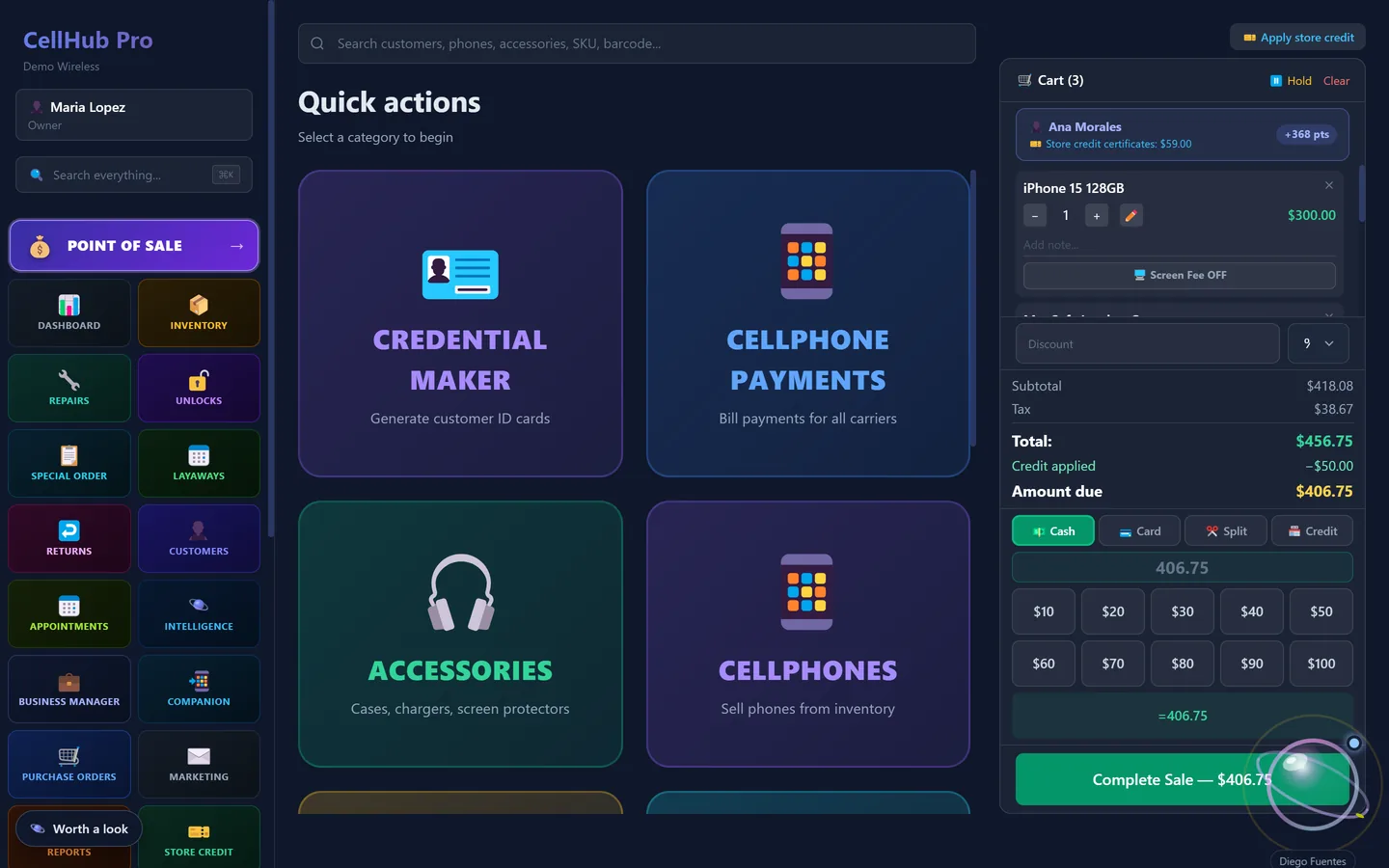
A $68.99 payment is not $68.99 in sales.
CellHub splits every bill payment the moment you ring it up. The plan payment passes through to the carrier, taxes and fees are set aside to remit, and only your commission counts as revenue.
Sample AT&T payment. The commission rate is the one you set per carrier in Settings.
Tax and fee amounts are estimates and may contain errors. Confirm what you owe with your accountant and CDTFA.
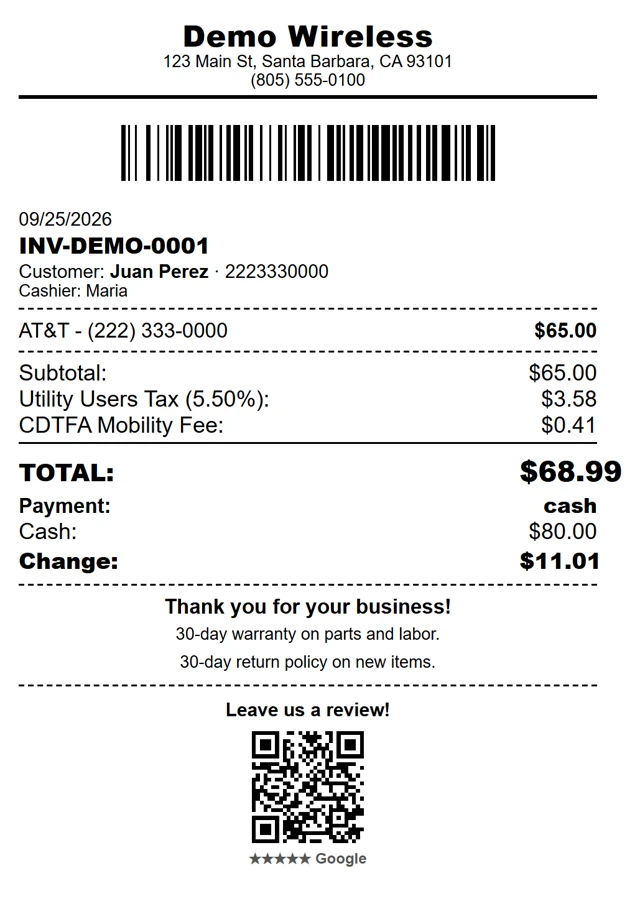
Every transaction your shop makes. One tap away.
The Point of Sale opens on the ten things a wireless counter does all day.
Credential Maker
Customer ID cards
Cellphone Payments
Bill payments for every carrier
Accessories
Cases, chargers, screen protectors
Cellphones
Phones sold from inventory by IMEI
Print Desk
Paste, rotate and print labels
Estimates
A quick estimate with a receipt
Services
Repairs and unlocking services
International Top Up
Boss Revolution · Tila TopUp
RMA Label
Return shipping labels, 4×6
Label Printer
Paste and print 4×6 labels
Real screens. Demo data.
Every module shares the same customers and the same register, so nothing is typed twice.
One cart for everything the counter does: phones from inventory, accessories, plan payments, repair and layaway deposits. Discounts, Store Credit and cash, card or split payment on every ticket.
Feel the flow.
Eight moments from a real day at the counter. Scroll and the app moves with you. Demo data throughout.
Same modules, same workflow, a different visual style.
Quarter ends. Your CDTFA estimate is ready.
Every sale is already split by type: product sales, phone bill payments, repairs and unlocks. Utility tax and CA fees are itemized, and the partnership summary for 1065 / K-1 / 1040 is built from the same sales, so you start the quarter with numbers to review, not a shoebox.
- CDTFA quarterly
- 1065 / K-1 / 1040
- W-9 contractor forms
Tax Center figures (CDTFA sales and use tax, utility users tax, state and local fees, and the 1065 / K-1 / 1040 summaries) are estimates built only from the sales recorded in CellHub. They are approximate, may contain errors or omissions, and are not tax, legal or accounting advice. Review every figure with your accountant and confirm with CDTFA, your state and the IRS before you file or pay.
Don’t show dashboards. Tell the owner what to do.
Operator reads your sales, repairs, layaways and customers, finds the money that’s waiting, explains why, and queues the next move. You approve. It executes.
- Detects before you noticeSlow days, dead stock, uncollected repairs
- Tells you whyThe reason behind a drop, not just a chart
- Ask your shop“Who should I call today?”
- Your choice of AIOptionally connect Claude, ChatGPT or Gemini
Approve from anywhere. Instantly.
Your cashier asks for 15% off a $599 scooter. Before you say a word, your phone shows cost, margin and what’s left after the discount. One tap.
- !Urgent, high, medium: every request ranked
- A message thread on every request
- Discounts, refunds and price overrides
Your data stays in your store.
CellHub Pro is a Windows desktop app. Sales, customers and inventory are stored on your store’s own computers. The online account handles only your subscription, license activation and downloads.
- Keeps selling offlineYour records live on your computers. When the internet drops, the register keeps working.
- Every register in syncOne Primary holds the store data. Secondary computers connect over your shop’s own network.
- 3 computers includedMain register, repair desk and a second register on one subscription.
- EN · ES · PTThe EN, ES and PT buttons sit in the app sidebar. The whole interface changes at once.
- Windows 10 and 11A desktop app that prints receipts, tickets and labels straight to your printers.
- Owner in controlAdmin PIN on sensitive actions and an edit history that shows who changed what.
Start with 14 days free.
Every module, Operator included, on up to 3 computers. Pick a plan when you are ready.
- 14-day free trial
- 3 computers included
- Walkthrough on demo data
What shop owners ask first.
What happens when the internet goes down?
You keep selling. Your records are on your store’s own computers, and your registers talk to each other over your shop’s network.
Does my customer data go to the cloud?
No. Sales, customers and inventory stay on your computers. CellHub’s online account handles only your subscription, license activation and downloads.
Can I set my own commission rates?
Yes. Set each carrier’s rate in Settings. Reports count that commission as your revenue, never the plan payment itself.
What do I need to run it?
A Windows 10 or 11 computer for each register. The subscription includes 3 computers.
Can I see it before I start?
Yes. Write to cellhubpro@gmail.com and we will walk you through the system on demo data, remote or in person.
Run tomorrow’s shift on CellHub.
14 days free on up to 3 computers.